You can track surf sessions without an Apple Watch by logging the spot, duration, board, conditions and a rating after you leave the water. Surf Log keeps those entries on your iPhone or iPad, with your quiver, goals and habits beside them.
What a watch captures, and what it misses
A surf watch captures movement: waves, paddling and speed. Your journal adds the details you remember from the water: which board you rode, how the conditions felt and what you practised. Choose manual logging when that record is what you want. Add a watch when you also want automatic ride detection and GPS tracks.
The manual logging method
- Log immediately after the surf: car park, before you drive off.
- Structured fields, not essays: spot, time, duration, board, wave/wind/tide, rating out of 5, one note.
- Same format every session so entries stay comparable.
- Review weekly to spot patterns in conditions, boards and spots.
A surf log you can read before your next session
Surf Log's App Store screenshot shows these three entries. The board and rating sit beside the date, so you can revisit what you rode and how the session felt.
| Date shown | Board | Session rating |
|---|---|---|
| 23 June 2026 | CI Happy Everyday | 5 out of 5 |
| 22 June 2026 | SharpEye Inferno 72 | 4 out of 5 |
| 16 June 2026 | CI Happy Everyday | 4 out of 5 |
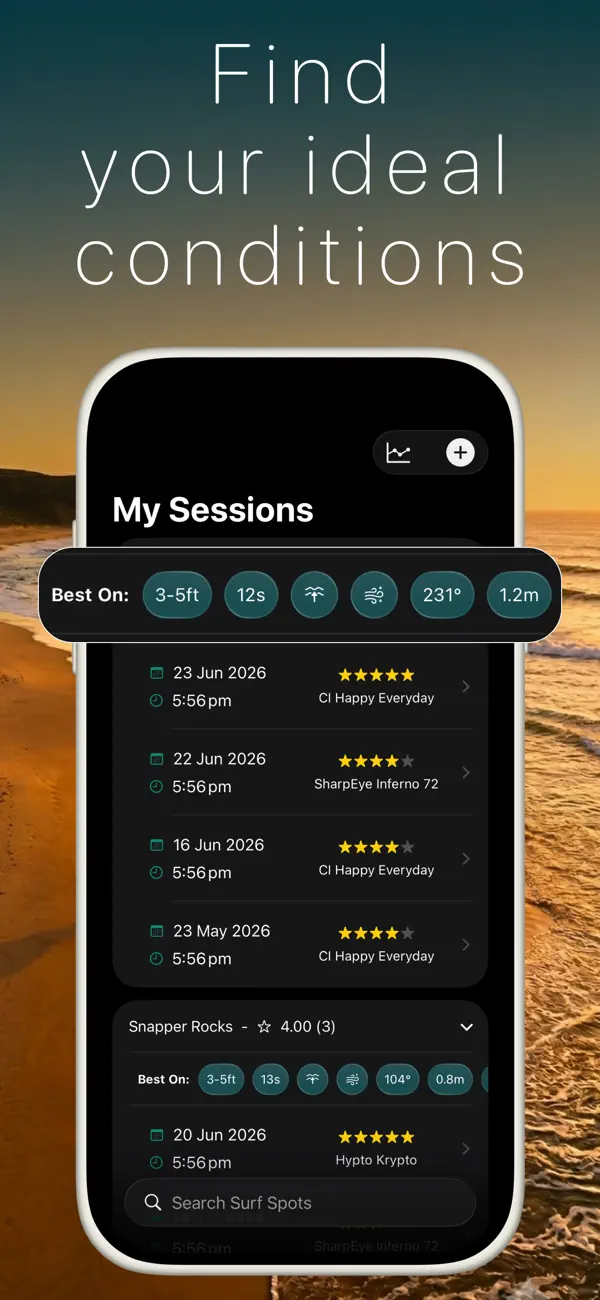
Before your next surf, look at the conditions attached to your higher-rated sessions at the same spot. Use that history to choose a board or a focus for the day. Keep adding notes when a session surprises you, so the rating has a reason behind it.
Duration without a watch
Accuracy is not a problem here. You don't need second-precision. Note when you paddled out and when you came in. "6:10 to 7:45" is plenty to build honest time-in-water stats over a season. The insight comes from the trend, not the decimals.
Who should still buy the watch
If you love wave-count leaderboards or train competitively for paddle fitness, a wearable adds real value, and it complements rather than replaces a journal. But if the goal is remembering your surfs, understanding your conditions and improving deliberately, manual logging gives you a useful record without buying a wearable.